Flyers and Brochures
Premium quality Flyers and Brochures are available in a variety of sizes with a wide range of folding options, ideal for showcasing all types of products and services.
- Printed using superior quality stocks
- Single or Double-sided Printing
- Available in a variety of sizes
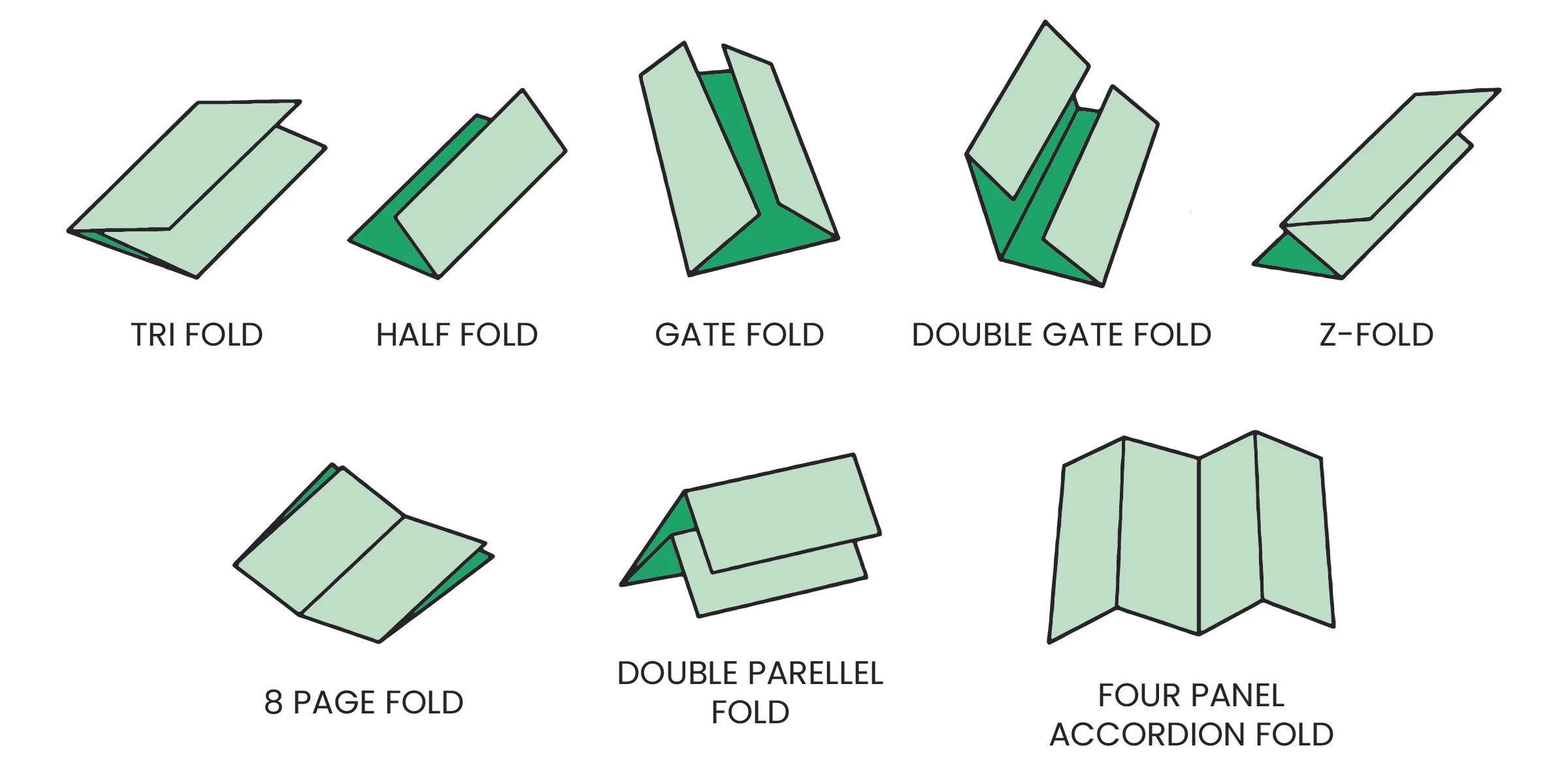
- Available in wide range of folding options
Premium quality Flyers and Brochures are available in a variety of sizes with a wide range of folding options, ideal for showcasing all types of products and services.
- Printed using superior quality stocks
- Single or Double-sided Printing
- Available in a variety of sizes
- Available in wide range of folding options
- Sizes
- 11" x 17"
- 5.5" x 8.5"
- 8.5" x 11"
- 8.5" x 14"
- Colorspec
- 4/4 (Full color both sides)
- 4/0 (Full color front)
- 4/1 (Full color front, 1 color back)
- Coating
- Aqueous Coating
- No Coating
- UV Gloss
- Folding Options
- FLAT - No Folding
- Half-Fold (Horizontal)
- Tri-Fold / Letter Fold
- Half-Fold (Vertical)
- Half-Fold
Design Templates
Design your flyers and brochures right the first time by using a template. Our templates are setup accurately assuring your print job is produced properly. To download, click the download template button below:
Download Template
Ordering & Artwork Setup Guide
Step 1. Choose Product
- If you can not find the product you are looking for submit a custom quote here
Step 2. Select Product Options
- Size
- Color
- Turnaround Time
- Coating
- Etc.
Step 3. Add Product to Shopping Cart
- You will see an instant price for all listed products
- Click the Add To Cart Button
Step 4. Review Shopping Cart
- Name Your Job
- Select Shipping Method
- Add Any Special Instructions
- Once Satisfied Click The Checkout Button or Continue Shopping
Step 5. Payment Page
- Select Billing Address
- Select Payment Method
- Review and Accept Terms/Conditions
- Click Complete Button
Step 6. Upload Files
- Upload Now
- Upload Later
- My Designer Will Upload
- Files Are At A 3rd Party Download Source (i.e. ftp, dropbox, sendspace)